
Quantum Logbook
GL LogisticsAuto & Vehicles
4.313.00 Reviews
- Version
- 2.3.2
- Installs
- 10.00K
- Age Rating
- Everyone
Screenshots
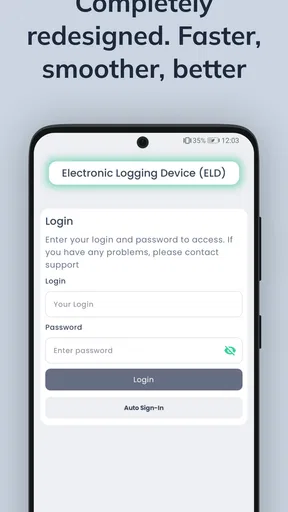
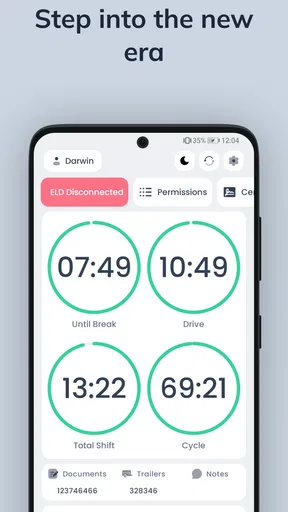
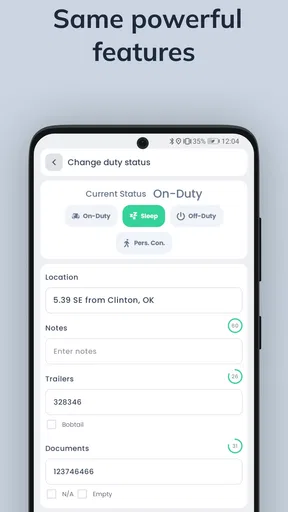
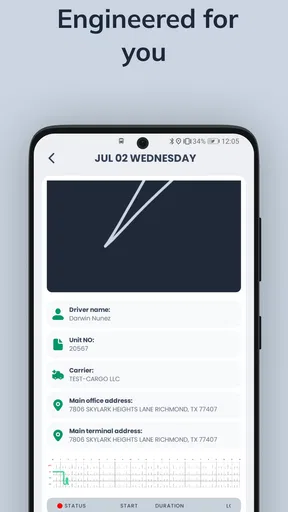
Our Review of Quantum Logbook
 Analysis by Appyee
When I look at a truck-log app, I do not judge it by how polished the first screen feels. I want to know whether it can fit into a real day: a driver climbing into the cab before sunrise, a dispatcher needing a clear update, a partner borrowing the same tablet at home, and a log that still makes sense when the day becomes complicated. That is the standard I applied to Quantum Logbook, an Auto & Vehicles app from GL Logistics.
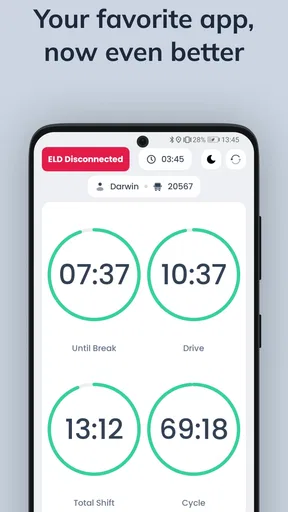
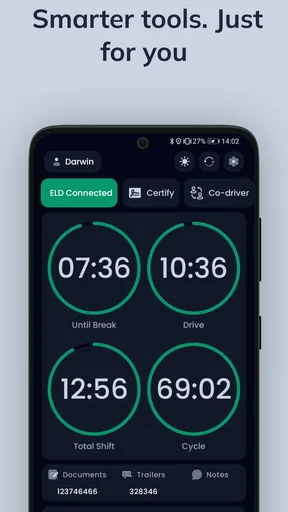
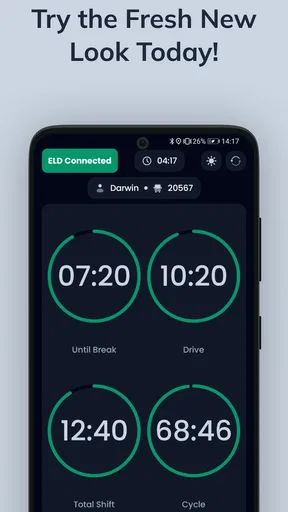
Its purpose is focused. This is an electronic logging app for truckers, built around FMCSA-certified electronic logging, driver logs, DVIR work, IFTA support, and hours-of-service compliance. It is free to use, rated for Everyone, and available for devices running Android 8.0 or later. The app has reached more than ten thousand installs and holds a 4.3 average from roughly ninety ratings, which suggests a useful level of interest without making it sound like a universal solution for every fleet.
My overall impression is that Quantum Logbook makes the most sense when one driver wants a practical digital logbook rather than a broad fleet-management platform. It can bring several compliance-related tasks together, but its value depends heavily on disciplined setup and consistent use. The app can simplify a driver's routine; it cannot replace careful review of duty status, vehicle information, or the rules that apply to a particular operation.
How Quantum Logbook fits into a shared household or work device
A realistic use case is a small trucking household where one person drives and another family member occasionally helps with paperwork, trip planning, or document checks. The driver might use the phone in the cab, while a shared tablet at home is used to review records or prepare for the next run. In that situation, the app is not just another utility. It becomes part of a chain of responsibility, and the boundaries around who is using it matter.
I would keep the driver's logging activity separate from casual household use. A spouse, child, or roommate may need to use the same device for an unrelated task, but that does not mean everyone should handle the driver's logbook. Electronic records are tied to a professional activity, so switching between people without a clear handoff could create confusion. Before anyone else uses the device, I would finish the current entry, lock the screen if the device supports it, and make sure the next person knows not to alter the driver's work records.
This is especially important when the phone is mounted in the truck and also serves as a personal device. Calls, navigation, messages, and entertainment can all compete for attention. Quantum Logbook is most useful when it has a defined place in the routine instead of being treated as an app opened only when someone remembers. I found that the safest habit is to check the log at natural transition points: before departure, after a change in duty status, during a planned break, and at the end of the shift.
A shared device can work, but it needs a human system around it. I would not assume that the app itself creates household profiles, child restrictions, or automatic separation between family members. The practical solution is to keep access limited, use the correct driver identity every time, and avoid letting another person “quickly fix” a log unless that person is genuinely authorized and understands the record.
Why the app is useful for the driver who does most tasks alone
Quantum Logbook has a clear advantage for an owner-operator or small carrier that wants one place for several recurring responsibilities. Instead of treating the daily log, vehicle inspection report, IFTA-related information, and hours-of-service work as completely separate chores, the driver can approach them through one trucking-focused app. That reduces the mental switching that often causes small omissions.
The strongest benefit is not that the app makes compliance effortless. It is that it gives the driver a repeatable workflow. I would use the log section during the day, complete the DVIR step as part of the vehicle inspection routine, and review the record before ending the shift. The IFTA information is more useful when handled as an ongoing habit rather than reconstructed from memory at reporting time.
That last point is easy to underestimate. Fuel-tax information is often treated as an office task, but the quality of the final record depends on what the driver captures during the trip. If the app lets the driver organize the relevant information as part of the normal workflow, it can reduce the unpleasant job of searching through receipts and notes later. I would still compare the entries against fuel receipts and the carrier's own process instead of trusting any single screen without review.
The app is also a reasonable fit for a driver who dislikes complicated software. Its store short description is simply “Quantum Logbook,” while its broader purpose is more specific: a compliance-oriented logbook for truckers. That focused identity is helpful. You are not opening it expecting route optimization, payroll, maintenance scheduling, or a full dispatch board. You are opening it to handle the records that belong to the driver's operating day.
Setup boundaries that matter before the first trip
The first setup should be treated as an accuracy exercise, not a quick installation. The current version is 2.3.2, and the app was released in March 2023. Those details are useful when checking whether a device can run it and when explaining which version is installed, but they do not remove the need to verify the actual driver and vehicle details entered during setup.
I would begin by identifying exactly whose records are being created. On a household device, this is the most important boundary. If two drivers share one phone or tablet, I would not rely on memory to switch between them. I would establish a clear procedure before the vehicle moves, because an incorrect driver identity can be more serious than a missed convenience feature.
The same care applies to vehicle information and operating details. A driver should review every field rather than accepting a default simply because it appears convenient. The app's role is to record and organize information; it does not know whether the selected vehicle, carrier arrangement, or duty status matches the real situation unless the user supplies the right context.
I also recommend setting up the app while stationary and unhurried. Doing it in a truck stop queue or immediately before departure invites mistakes. A short test run through the log and DVIR workflow can reveal whether the driver understands where to record a change, how to inspect an entry, and where to look for an issue. This is one of the less obvious strengths of a focused app: because the purpose is narrow, a driver can rehearse the essential routine without learning an entire fleet-management system.
There is a trade-off here. A simpler app may feel less intimidating, but simplicity can make users overconfident. If the screen looks straightforward, it is tempting to tap through without thinking about the underlying rule. I would use Quantum Logbook as a structured recordkeeping tool, not as an authority that decides every compliance question for me.
Daily coordination between driver, home, and dispatch
Coordination is where a logbook app either becomes genuinely useful or remains a private notebook on a screen. A driver may need to tell someone at home when the shift is ending, while a small carrier may need records that support a conversation with dispatch. Quantum Logbook can help organize the driver's side of that exchange, but the people involved still need an agreed communication routine.
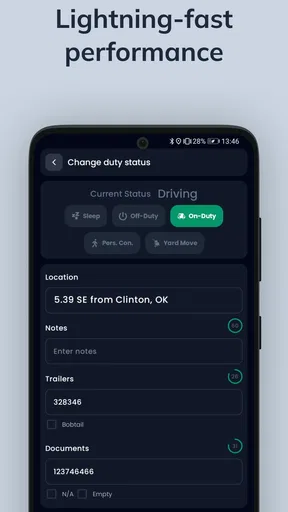
For example, imagine a driver leaves early, discovers a defect during the inspection, and later changes duty status after waiting for instructions. The useful workflow is not merely to record the event at the end of the day. The driver should complete the DVIR process when the issue is found, record the relevant status change at the appropriate time, and then notify the responsible person through the normal company channel. The app can support the record; it should not be mistaken for a replacement for that conversation.
In a household setting, I would separate coordination from account access. A family member can help by checking whether the driver has completed the evening review or by reminding them to gather fuel receipts, but that person should not casually enter information on the driver's behalf. This distinction protects trust. It also makes it easier to identify who actually knew a fact and when it was recorded.
One practical tip is to create a simple end-of-day checklist beside the app: review duty status, inspect unresolved DVIR items, confirm the vehicle used, and gather the documents needed for the IFTA process. I am not presenting that as a built-in Quantum Logbook feature. It is a companion habit that makes the app more reliable because it connects the digital record with the physical paperwork and the driver's memory.
For a small fleet, I would also agree on what “done” means. Does the driver only need to complete the log, or must they also report inspection findings? Does the office review the record daily or only when needed? Quantum Logbook can be part of either arrangement, but the app cannot invent a company policy. Clear expectations prevent a common failure: everyone assumes someone else checked the record.
DVIR and HOS work: where careful habits matter most
The DVIR function is valuable because vehicle condition and driver-status records belong to the same real-world trip, even though they answer different questions. A log tells the story of the driver's activity. A vehicle inspection report concerns the condition of the equipment. I would keep those concepts distinct while using the same app to manage both.
When I think through a practical inspection workflow, I want the report to reflect what was actually observed, not what usually happens. If a defect is found, it should be handled according to the carrier's process and the applicable requirements. The app can make it easier to record the event, but a digital entry does not repair a vehicle or authorize a driver to continue when the equipment is unsafe.
Hours-of-service compliance has a similar limitation. Quantum Logbook is designed to help with HOS records, which is a meaningful reason to choose it over an ordinary notes app or paper notebook. Still, the driver remains responsible for selecting the correct duty status and reviewing the result. A mistaken tap can create a neat-looking but inaccurate record.
My advice is to review the timeline after unusual events rather than waiting for the end of the week. Loading delays, roadside inspections, repairs, sleeper-berth changes, and unexpected waiting periods are exactly when a driver is most likely to forget what was entered. A quick review while the memory is fresh is more useful than trying to reconstruct the day from texts and fuel receipts.
This is also where Quantum Logbook may not be the best choice for everyone. A large carrier with complex operations, many drivers, and a dedicated compliance department may need deeper administrative tools, centralized oversight, or integrations beyond the app's focused logbook role. In that environment, a full fleet platform could be a better fit even if it takes longer to learn.
IFTA information without leaving everything until the deadline
The IFTA component is one of the reasons this app stands apart from a basic electronic log. Fuel-tax reporting depends on organized trip and fuel information, and a driver who waits until the reporting period ends can face a miserable sorting job. I would use Quantum Logbook as a place to keep the relevant details current, then compare them with receipts and any office records.
A useful habit is to enter information soon after fueling, while the receipt is still in the cab and the location is obvious. That is more dependable than relying on a photograph with no context or a memory of which state the stop was in. If the driver shares responsibilities with someone at home, the handoff should include the physical receipts, not just a message saying that the app was updated.
The trade-off is that digital organization does not eliminate reconciliation. Receipts can be lost, odometer readings can be mistyped, and a trip can cross jurisdictions in ways that require careful review. I would regard the app as a working ledger that makes the final process easier, not as a substitute for checking the numbers against the source documents.
This workflow is particularly useful for an owner-operator who does their own administration. It is less compelling for a driver whose carrier already handles every IFTA detail through an established office system. In that case, the app may still help with personal organization, but duplicating records can create more work unless everyone agrees which record is authoritative.
Age, trust, and responsible access in a household
The Everyone content rating means the app is not presented as age-restricted entertainment, but that should not be confused with suitability for unsupervised professional use by a child. A young family member may be able to open the app technically, yet they may not understand the legal and operational importance of changing a log or recording a vehicle defect.
I would explain the boundary plainly: household members may help with the device, but only the responsible driver or an authorized person should create or correct professional records. That is a trust issue as much as a technical one. A shared password, an unlocked tablet, or a casual “I fixed it for you” can make it difficult to know whether an entry reflects the driver's actual activity.
This matters even more when a child uses the same tablet for school or games. I would finish and secure the driver's session before handing over the device, and I would check the app again afterward if the device has been shared. I would not assume that family-oriented device use and trucking records can safely mix without a clear routine.
For couples or relatives who both drive, separate identities and careful switching are essential. If the app does not fit the way a household shares hardware, the better option may be dedicated devices or a different system designed around multi-driver administration. Convenience is not worth creating uncertainty about whose record is on screen.
What the rating and platform requirements tell me
Quantum Logbook's 4.3 average from about ninety ratings gives it a positive public signal, while the smaller review base means I would still test it against my own workflow before making it central to a business. The app has more than ten thousand installs, so it is not an obscure experiment, but those figures should be read as context rather than proof that it will suit every truck, carrier, or household.
The minimum requirement of Android 8.0 or newer is accommodating for many existing devices. That can matter when a small operator wants to reuse an older phone or tablet instead of buying a dedicated unit. I would still check the device's condition, battery life, screen visibility, and mounting position. An app that runs technically is not automatically practical in a vibrating cab with bright sunlight and gloves.
Because the app is free, the entry barrier is low. That makes it easier to try without committing money, but it also means I would spend time validating the workflow before relying on it for important records. Free does not mean risk-free. The real cost can be a confusing setup, duplicated administration, or a record that was not reviewed properly.
Who should choose it, and who should look elsewhere?
I would recommend Quantum Logbook to an independent trucker, a small carrier, or a driver who wants a focused Android tool for electronic logs, DVIR activity, IFTA organization, and HOS-related recordkeeping. It is especially appealing when the alternative is a paper log plus scattered notes, receipts, and inspection records. Bringing those tasks into one trucking-specific app can make the day easier to audit personally.
I would be more cautious for a large fleet, a company that needs extensive office-side control, or a household where several drivers must share one device without confusion. In those cases, a more comprehensive fleet system or separate driver devices may be worth the extra complexity. I would also skip it if my main need were navigation, load matching, maintenance management, payroll, or dispatch coordination; those are different jobs from keeping a compliant logbook.
Compared with paper, the app offers a more organized and searchable approach, with less dependence on handwriting and manual reconstruction. Compared with a general notes app, it is much better aligned with trucking-specific records. Compared with a full fleet platform, it is likely to feel more approachable for an individual driver, but it may not provide the same breadth of business oversight. That is the central trade-off: focused usefulness instead of an all-in-one operation center.
My household verdict
After considering the everyday workflow, I see Quantum Logbook as a practical tool that rewards clear boundaries. I like the fact that its purpose is easy to understand: it is built for truckers who need electronic logging and related compliance tasks, not for every possible transport-management problem. The combination of logs, DVIR, IFTA, and HOS support gives a solo driver a sensible starting point.
My recommendation comes with a condition: treat the app as part of a process. Set it up while parked, confirm the driver and vehicle information, record events close to when they happen, review unusual days, and keep the app's records aligned with receipts and company procedures. In a shared household, protect the driver's identity and do not let casual device access become casual record editing.
GL Logistics has produced an app that should appeal to people who want a free, focused option rather than a large and complicated fleet suite. I would install it on a compatible Android device, run through a complete practice day, and decide whether its workflow matches the operation before depending on it for every trip. For the owner-operator who values simplicity and can maintain careful habits, Quantum Logbook is a credible choice. For multi-driver households or larger businesses that need detailed centralized coordination, I would compare it with a more administrative platform before committing.
Verdict
Strengths of Quantum Logbook
- Records observations quickly with a focused, distraction-free interface.
- Useful for organizing quantum experiments, notes, and measurement results.
- Supports consistent documentation for repeatable research workflows.
- Helps keep technical records accessible from a mobile device.
- Suitable for students, educators, and independent physics enthusiasts.
Limitations of Quantum Logbook
- May feel too specialized for users without a quantum physics background.
- Advanced analysis and visualization tools may be limited.
- Manual data entry can become tedious during lengthy experiments.
- Some features may require familiarity with scientific notation and terminology.
- Mobile screen space can make complex logs harder to review.
Similar Picks in This Category
View All
Android Auto
Google LLC4.1

maxim — order a taxi & food
PT. SITO4.7

Штрафы ГИБДД: проверка с фото
Pays LLC – Штрафы ГИБДД4.7

Номерограм – проверка авто
Авто Ассист4.8

Дром Авто
Дром4.9

Frequently Asked Questions
What is Quantum Logbook and what can it be used for?
Quantum Logbook is designed as a digital record-keeping tool for organizing notes, observations, experiments, tasks, or other structured information in one place. Before downloading it, consider whether its workflow matches your needs: users who prefer clear, searchable logs may find it useful, while those looking for a full project-management suite may need additional tools for calendars, collaboration, or advanced reporting.
Is Quantum Logbook suitable for beginners?
The app is generally approachable for users who are comfortable creating entries, browsing records, and adjusting basic settings. However, the experience may depend on how much information you want to organize and whether you use its more advanced features. New users should spend a few minutes exploring the interface and checking the available help or onboarding guidance before relying on it for important records.
Does Quantum Logbook work offline, and will my information be saved securely?
Offline access and data protection are important points to verify before installation. Depending on the version and device, some logbook functions may work without an internet connection, while synchronization or backups may require online access. Review the app’s current privacy policy, storage method, backup options, and permissions so you understand where your entries are kept and how they can be recovered.
What devices and operating systems support Quantum Logbook?
Quantum Logbook availability and performance can vary between Android and iOS devices, as well as between operating-system versions. Before downloading, check the official store listing for the minimum supported version, required storage, and any device restrictions. It is also worth confirming whether your records can be transferred between platforms if you plan to change phones or use more than one device.
Is Quantum Logbook free to download, and are there purchases or advertisements?
The download model may differ according to the platform and the developer’s current release. Some features may be available at no cost, while premium tools, subscriptions, advertisements, or optional purchases could apply. Check the store page carefully before installing, especially the in-app purchase section and subscription terms. This will help you understand the total cost and avoid unexpected charges after the trial period.
